
Button vs Wi-Fi vs Video Pet Feeders: A Practical Comparison Based on Network and Functionality
Date: 2025-12-25 Categories: Reviews Hits: 1152
Button vs Wi-Fi vs Video Pet Feeders: A Practical Comparison Based on Network and Functionality
Introduction
Why Connectivity Matters More Than Appearance in Automatic Pet Feeders
Automatic pet feeders are often marketed by their appearance, capacity size, or material quality. While those factors may influence purchasing decisions, they do not determine whether a feeder actually works well in daily life.
From a practical standpoint, the core difference between button-based, Wi-Fi-enabled, and video-enabled pet feeders lies in their network characteristics and functional behavior—not how they look or how much food they hold.
Connectivity defines:
how feeding schedules are created and managed,
whether feeding can be controlled remotely,
how reliable the device is when the network is unstable,
and how much real interaction or feedback the user receives.
In this article, we will compare button feeders, Wi-Fi feeders, and video feeders purely from a functional and network-based perspective. We will intentionally exclude design, capacity, and material considerations, and focus only on what these feeders can realistically do in everyday use—and what they cannot.
Section I
Button-Controlled Pet Feeders: Offline Reliability and Functional Simplicity
Network Characteristics: Fully Offline by Design
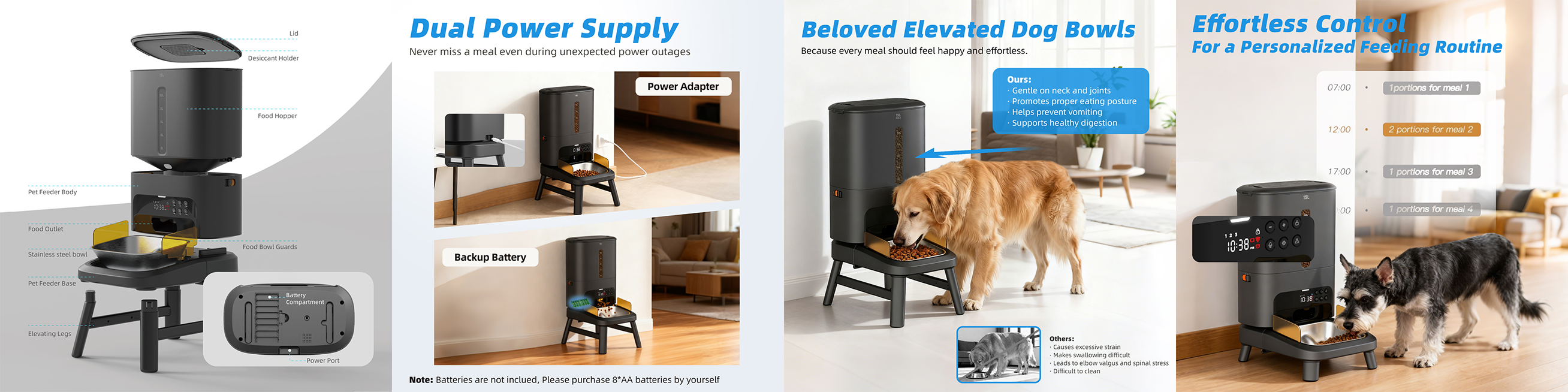
Button-controlled pet feeders operate without any network connection. There is no Wi-Fi, no Bluetooth pairing, and no mobile app involvement. All settings are configured directly on the device through physical buttons and, in some cases, a small built-in display.
From a network perspective, this makes button feeders completely independent of external systems:
No reliance on home Wi-Fi
No cloud services
No firmware updates
No app compatibility issues
Once powered on and configured, the feeder executes its programmed schedule locally.
Functional Capabilities in Real-World Use
Although button feeders are often described as “basic,” their core feeding functionality is typically stable and predictable.
Common functional features include:
Scheduled feeding times set directly on the device
Adjustable portion sizes per feeding
Manual feed button for instant dispensing
Independent operation as long as power is supplied
Because all logic is processed locally, feeding actions are executed immediately and consistently, without delay caused by network latency or server communication.
Practical Advantages
From a usability standpoint, button feeders offer several tangible benefits:
High operational stability: no connection drops or app failures
Low learning curve: simple setup without account registration
Strong reliability in poor network environments
Predictable behavior, even during power or internet disruptions (when battery backup is present)
For users who prioritize consistent feeding over advanced features, this simplicity can be a strength rather than a limitation.
Functional Limitations
However, the lack of connectivity also introduces clear constraints:
Feeding schedules cannot be adjusted remotely
No real-time notifications or feeding logs
No visibility into feeding events when away from home
No integration with other smart home systems
Once the feeder is set, any change requires physical access to the device.
Best-Suited Use Scenarios
Button-controlled feeders are most practical for:
Users with stable daily routines
Homes without reliable Wi-Fi coverage
Pet owners who value “set it once and forget it” functionality
Situations where feeding consistency matters more than remote control
From a functional perspective, button feeders represent the most network-independent and failure-resistant option, but with limited flexibility.
Section II
Wi-Fi Pet Feeders: Remote Control, Automation, and Network Dependency
Network Characteristics: Always Connected, Yet Not Fully Autonomous
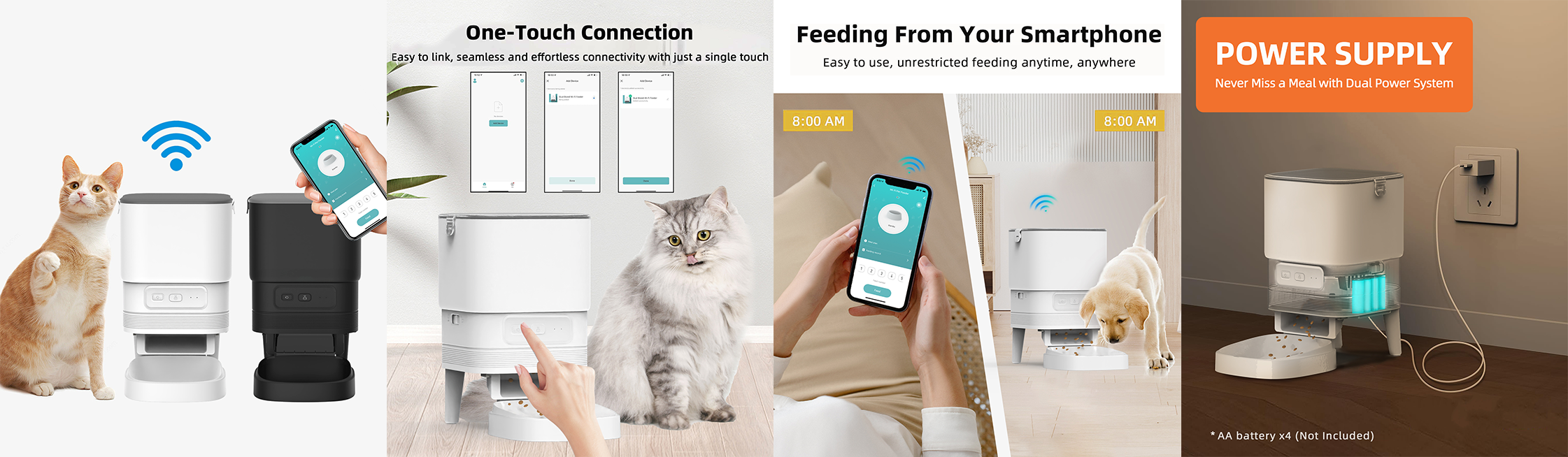
Wi-Fi pet feeders connect to a home wireless network—typically via a 2.4 GHz connection—and interact with users through a mobile application and cloud-based services.
Compared with button-controlled feeders, Wi-Fi models shift part of their operational logic outward:
Feeding schedules and commands are configured through an app
Device status and alerts are transmitted via the network
User interaction depends on both local hardware and remote services
Although these feeders are commonly described as “smart,” their intelligence is fundamentally network-assisted rather than fully self-contained.
Functional Capabilities Enabled by Connectivity
Wi-Fi connectivity significantly expands functional flexibility in daily use.
Common features include:
Remote manual feeding via mobile app
Detailed scheduling options (time, portion size, frequency)
Feeding history and activity logs
Push notifications for feeding events and error states
Alerts for low food levels, jams, or power interruptions
Firmware updates delivered over the network
These features transform the feeder from a fixed, locally configured device into a remotely managed feeding system, particularly useful for users with dynamic schedules.
Behavior During Network Interruptions: Function Works, Confidence Drops
It is important to clarify a critical but often misunderstood behavior of Wi-Fi pet feeders:
Most Wi-Fi feeders are designed to continue executing pre-set feeding schedules even when the network connection is temporarily interrupted, as long as the device remains powered.
In practical terms:
Feeding schedules stored locally will still be followed
Portion sizes and timing remain unchanged
Scheduled dispensing does not stop solely due to Wi-Fi loss
From a functional standpoint, this preserves basic feeding reliability.
However, the user experience during network interruptions tells a different story.
When the network is down, the mobile app typically becomes unavailable or only partially functional, which means:
Feeding status cannot be checked remotely
Manual remote feeding is disabled
Push notifications and confirmations are not received
As a result, even if the feeder is technically operating as intended, users who rely on the app for reassurance often experience uncertainty or anxiety, simply because they cannot verify what is happening in real time.
This highlights a subtle but important trade-off: while automation can continue offline, user confidence in Wi-Fi feeders is strongly tied to app visibility, not just device behavior.
Practical Advantages in Real-Life Use
When the network is stable, Wi-Fi feeders offer clear functional advantages:
Remote intervention when routines change unexpectedly
Centralized management for multi-pet households
Visibility into feeding patterns over time
Reduced need for physical access to the device
In these conditions, Wi-Fi feeders deliver a strong balance between automation and control.
Functional Limitations and Trade-Offs
Despite their versatility, Wi-Fi feeders introduce constraints that do not exist in offline systems:
Initial setup requires app installation and network configuration
Real-time control is unavailable during outages
App stability and cloud reliability directly affect usability
Users must trust that the device is functioning correctly when feedback is absent
In practice, Wi-Fi feeders trade a degree of independence for convenience. They work best in environments where connectivity is stable—and where users are comfortable relying on software as part of the feeding process.
Best-Suited Use Scenarios
Wi-Fi pet feeders are most practical for:
Owners who need remote scheduling and control
Households managing multiple feeding routines
Users who value feeding logs and notifications
Homes with consistent and reliable Wi-Fi coverage
Functionally, Wi-Fi feeders occupy the middle ground between offline reliability and fully interactive systems, offering strong everyday practicality—along with new forms of dependency.
Section III
Video Pet Feeders: Visual Confirmation, Advanced Connectivity, and Higher Network Demands

Network Characteristics: From Control Connectivity to Data Transmission
Video pet feeders build upon button-controlled and standard Wi-Fi feeders by integrating a camera module for visual monitoring. It is important to clarify that audio functions alone do not define video feeders.
Many mature button-based and Wi-Fi feeders already support:
Pre-recorded voice playback during feeding
Scheduled audio cues to attract pets
Basic speaker output for familiarity and routine
The fundamental distinction of video feeders lies in the addition of continuous visual data transmission, not audio output.
Because video streaming places significantly higher demands on network throughput and stability, most reliable video pet feeders are designed to support 5G (5 GHz) Wi-Fi networks, especially when equipped with:
1080P high-resolution cameras
Infrared or night-vision functionality
Real-time or near-real-time video streaming
This marks one of the most important network-level differences between video feeders and the other two categories.
Why 5G Support Matters for Video Feeders
Unlike button or standard Wi-Fi feeders, which transmit relatively small control signals and status data, video feeders must continuously upload visual information.
Supporting 5G Wi-Fi allows video feeders to:
Handle higher data throughput required by 1080P video
Reduce latency during live viewing
Improve stability when streaming video and audio simultaneously
Maintain usable performance during night-vision operation
Without sufficient network bandwidth, video quality degrades quickly, directly impacting the feeder’s core value: visual confirmation.
By contrast, button feeders and non-video Wi-Fi feeders typically operate reliably on 2.4 GHz networks alone, as their data requirements are minimal.
Functional Capabilities Enabled by the Camera
With adequate network support, video feeders extend functionality beyond automation into observation and verification.
Common video-related functions include:
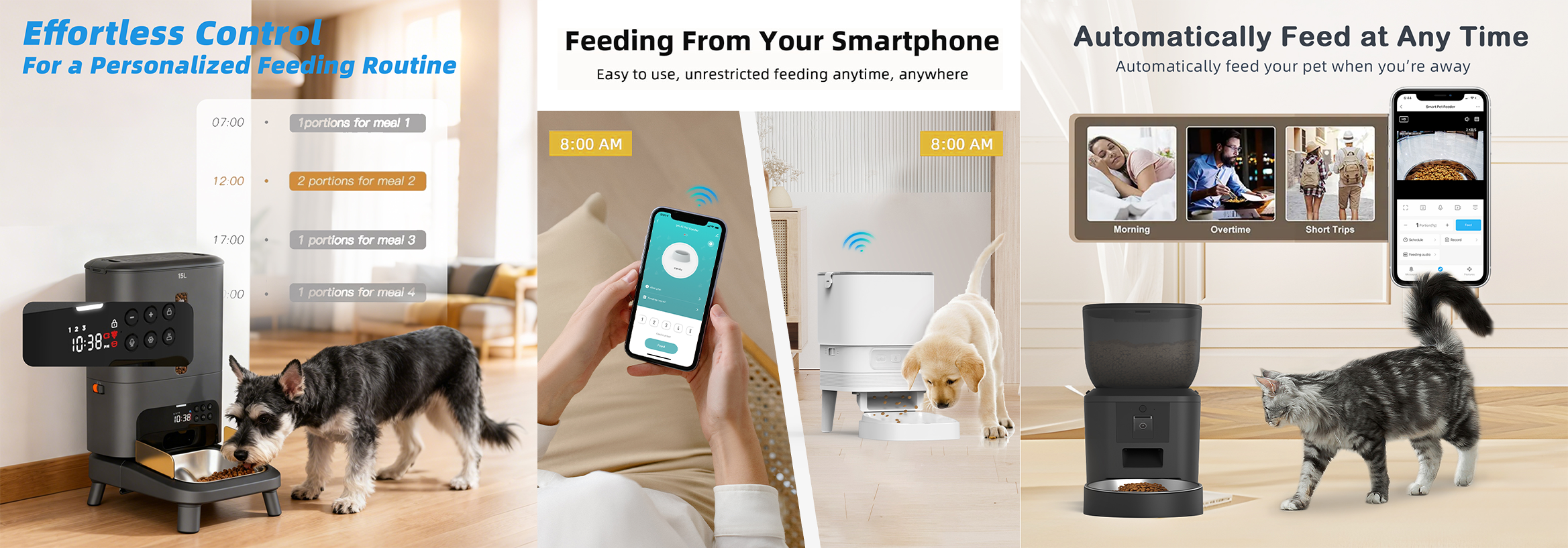
Live video viewing of the feeding area
Manual feeding with real-time visual confirmation
Motion or pet-activity detection
Photo and video recording
Cloud-based or local (SD card) video storage
While voice playback may already exist in non-video feeders, the camera fundamentally changes how feeding outcomes are verified.
Visual Confirmation vs Audio Cues
In button feeders and standard Wi-Fi feeders without cameras, users must infer results:
Food was scheduled—did it actually dispense?
The feeder played a voice cue—did the pet respond?
A notification was sent—did the pet eat?
Audio cues provide familiarity, but confirmation remains indirect.
Video feeders eliminate much of this uncertainty by allowing users to:
See food dispensing as it happens
Observe whether the pet approaches and eats
Identify abnormal behavior, missed meals, or feeding conflicts
This directly addresses the user anxiety discussed in Section II. Where audio reassures pets, visual feedback reassures owners.
Trade-Offs Introduced by Advanced Connectivity
The same features that improve transparency also increase dependency:
Higher and more consistent bandwidth requirements
Greater sensitivity to network quality and upload speed
Increased power consumption
More complex system architecture
As with standard Wi-Fi feeders, pre-set feeding schedules may continue to operate locally during short-term network interruptions if power is maintained. However, video and night-vision functions are typically the first to become unavailable when connectivity degrades.
In such cases, the feeder may still dispense food correctly, but the loss of video removes the primary functional advantage that distinguishes video feeders.
Best-Suited Use Scenarios
Video pet feeders are most practical for:
Owners who require visual confirmation, not just automation
Users who depend heavily on app-based monitoring
Pets with irregular feeding behavior that benefits from observation
Homes with stable, high-quality internet connections, including 5G Wi-Fi support
From a functional perspective, video feeders offer the highest level of visibility and reassurance, while also introducing the highest level of network dependency—a trade-off that must be evaluated realistically.
Comparison Table: Button vs Wi-Fi vs Video Pet Feeders
| Comparison Dimension | Button Feeders | Wi-Fi Feeders | Video Feeders |
|---|---|---|---|
| Network Requirement | None (Fully Offline) | Required for setup & remote control | Required for control and video transmission |
| Primary Network Role | Not applicable | Command & status synchronization | Continuous data transmission (video + audio) |
| Feeding Schedule Execution | Fully local | Local (after setup) | Local (after setup) |
| Behavior During Network Outage | Unaffected (if powered) | Scheduled feeding continues, app unavailable | Scheduled feeding continues, video unavailable |
| Remote Feeding Control | No | Yes (via app) | Yes (via app + visual confirmation) |
| App Dependency | None | Medium | High |
| Feeding Confirmation Method | Assumed (time-based) | App logs & notifications | Real-time visual confirmation |
| User Feedback During Outage | No feedback needed | Loss of confirmation causes uncertainty | Loss of video causes high perceived reliability drop |
| Audio / Voice Functions | Often supported (basic playback) | Commonly supported | Commonly supported |
| Core Differentiator | Offline reliability | Remote control & automation | Camera + visual verification |
| Camera | No | No | Yes |
| Typical Camera Specs | — | — | 1080P, night vision |
| Supported Wi-Fi Bands | — | Mostly 2.4 GHz | 2.4 GHz + 5 GHz (5G) |
| Bandwidth Sensitivity | None | Low | High |
| Power Consumption | Low | Medium | High |
| System Complexity | Low | Medium | High |
| Perceived Reliability | High (simple & predictable) | High when online, lower when offline | High when online, lowest during outages |
| Best Use Scenario | Stable routines, no remote need | Flexible schedules, remote management | Travel, reassurance, behavior monitoring |
Final Conclusion
Functionality Is Defined by Network Dependency, Not Feature Count
When comparing button-controlled, Wi-Fi-enabled, and video-enabled pet feeders, it becomes clear that the real difference is not how “smart” a product appears, but how deeply it depends on network connectivity to deliver its core value.
Button feeders represent the most independent category. Their functionality is entirely local, which makes them predictable and resistant to external failure. They do not offer flexibility or feedback, but they also do not create uncertainty. When consistency matters more than control, this simplicity remains highly practical.
Wi-Fi feeders introduce meaningful improvements in automation and remote management. They allow users to adjust schedules, trigger feedings, and review logs from anywhere. However, this convenience comes with a psychological shift: user confidence becomes tied to app availability, even though the feeder itself may continue working offline. Functionality remains, but visibility does not.
Video feeders go one step further by transforming connectivity from a control layer into a data transmission layer. The addition of a camera—often paired with 1080P resolution, night vision, and 5 GHz Wi-Fi support—changes how feeding success is verified. Instead of assuming or trusting logs, users can see outcomes directly. This visual confirmation reduces uncertainty, but it also increases reliance on stable, high-quality networks. When connectivity degrades, the loss of video has a greater impact on perceived reliability than on actual feeding performance.
Ultimately, there is no universally “better” feeder type. Each category reflects a different balance between automation, visibility, and network dependency. The most practical choice depends not on feature quantity, but on how much connectivity a user is willing—and able—to rely on in daily life.
Choosing the right feeder means choosing the level of network involvement that aligns with real-world conditions, not ideal scenarios.
FAQ: Button, Wi-Fi, and Video Pet Feeders Explained
However, during a network outage, the mobile app typically cannot be accessed. Users may not receive notifications or be able to confirm feeding events remotely, which can create uncertainty despite normal operation.
This means the feeder may still dispense food correctly, but the primary advantage of video feeders—visual verification—is temporarily lost.
The key difference of video feeders is not audio capability, but the presence of a camera that enables visual confirmation and monitoring.
5G (5 GHz) Wi-Fi provides higher bandwidth and lower latency, which helps maintain stable video quality and smoother real-time viewing. Button feeders and non-video Wi-Fi feeders usually function reliably on 2.4 GHz networks alone.
— Button feeders are the most network-independent and predictable, as they operate entirely offline.
— Wi-Fi feeders are reliable in execution but rely on apps for user confirmation.
— Video feeders provide the highest transparency when the network is stable, but are also the most sensitive to connectivity quality.
Each type is reliable within its intended operating conditions.
Wi-Fi feeders may still function correctly, but loss of app access can affect user confidence. Video feeders are the least suitable in such conditions due to their higher network requirements.
For users with stable routines and minimal need for feedback, button or standard Wi-Fi feeders often provide sufficient functionality.
— Button feeders rely on no network
— Wi-Fi feeders rely on connectivity for control and feedback
— Video feeders rely on connectivity for continuous data transmission
This dependency directly shapes both functionality and user experience.
— Network stability at home
— Need for remote control or confirmation
— Tolerance for app dependency
— Preference for simplicity versus visibility
The most practical choice is not the feeder with the most features, but the one whose network dependency aligns with real-world conditions.