
Why Does My Automatic Litter Box Say “Waste Bin Full”? Common Causes & Fixes
Date: 2026-01-16 Categories: FAQ Hits: 2670
Why Does Your Automatic Litter Box Keep Saying “Waste Bin Full”?

If your automatic litter box frequently shows a “Waste Bin Full” alert even when the bin is clearly not full, you are not alone. This is one of the most common complaints among users of automatic litter boxes across brands and models.
In most cases, this issue is not caused by a defective product, but by sensor logic, installation details, or usage habits that are easy to overlook. Below, we break down the real reasons behind false “full bin” alerts and explain how to fix or prevent them.
1. Infrared Sensors Are Being Blocked (Most Common Cause)
Most automatic litter boxes rely on infrared (IR) sensors to detect waste accumulation. These sensors monitor whether the waste pile reaches a preset height.
Typical blocking scenarios:
The trash bag is installed too high
The bag folds or wrinkles over the sensor window
Excess bag material hangs loosely inside the bin
Dark-colored or opaque bags interfere with IR reflection
Why this causes false alerts:
Infrared sensors do not detect “volume” but line-of-sight obstruction. Once the sensor path is blocked, the system assumes the bin is full.
✅ Solution:
Use the recommended bag size
Flatten the bag tightly against the bin walls
Ensure no plastic covers or overlaps the sensor area
2. Waste Is Piling Up Unevenly Inside the Bin
Automatic litter boxes are optimized for even waste distribution, but real-world usage often leads to uneven stacking.
Common reasons:
Clumps stick together due to high humidity
Lightweight litter falls to one side
Multiple cats use the box frequently without intermediate cleaning cycles
Result:
The waste pile reaches the sensor height prematurely on one side, triggering a “full” alert even though total capacity remains.
✅ Solution:
Enable automatic cleaning after each use
Periodically shake or level the waste bin
Avoid overly sticky or fine-grain litter types
3. Incorrect Litter Type or Excess Litter Dust
Not all cat litter works well with automatic systems.
Problematic litter characteristics:
Ultra-fine dust that accumulates on sensors
Highly absorbent litter that forms oversized clumps
Non-clumping litter that scatters unpredictably
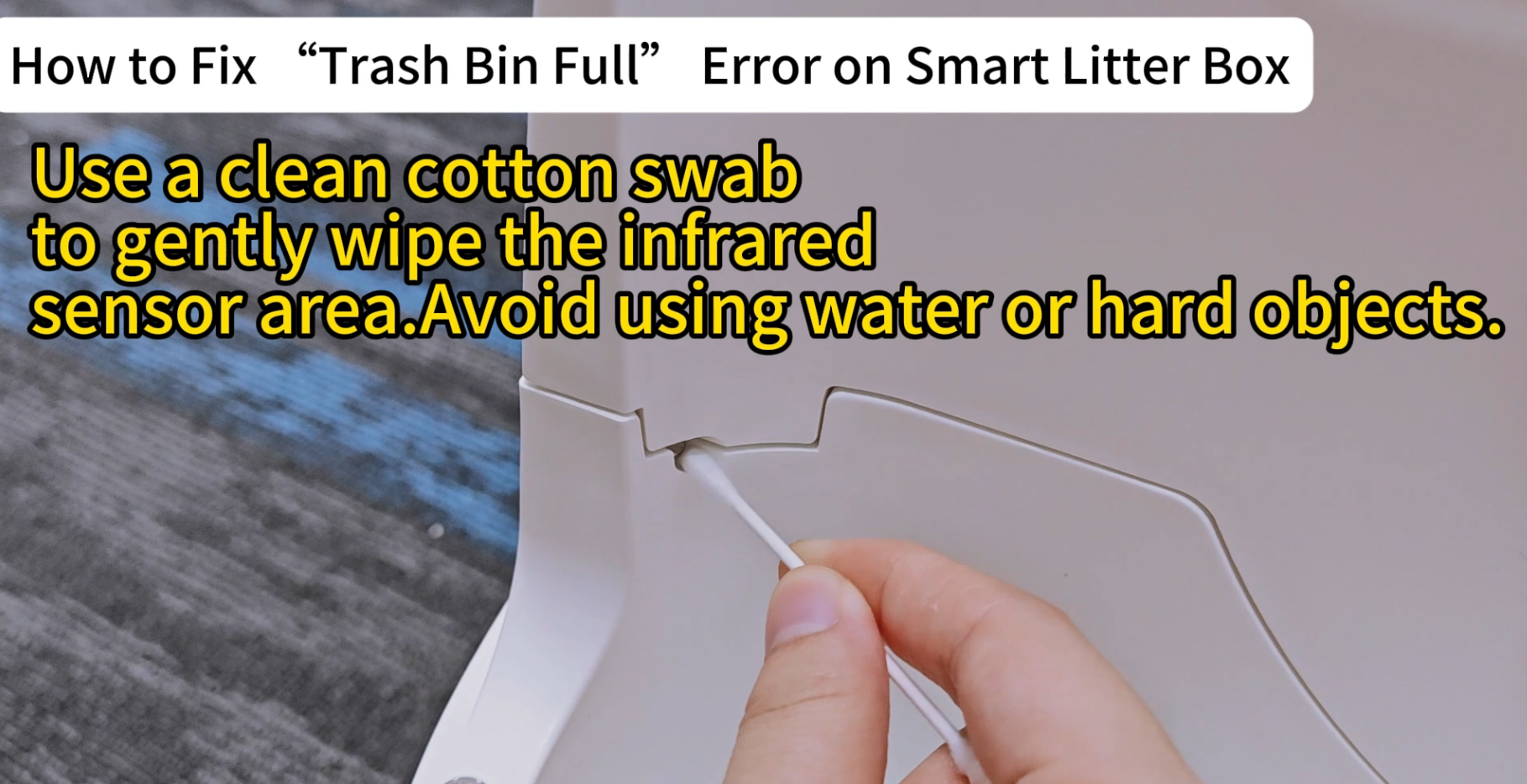
Dust buildup on infrared lenses can cause constant false detection.
✅ Solution:
Use clumping litter recommended by the manufacturer
Clean sensor windows regularly with a dry cloth
Avoid mixing different litter types
4. Garbage Bag Is Too Thick or Reflective
Some users replace original bags with household trash bags that are too thick, glossy or reflective, or dark-colored.
These materials can reflect or absorb infrared light improperly, confusing the detection system.
✅ Solution:
Use thin, matte-finish trash bags
Avoid reflective inner coatings
Match the recommended bag dimensions as closely as possible
5. Sensor Calibration or Software Logic Sensitivity
Automatic litter boxes use conservative safety logic to prevent overflow. In multi-cat households, the system may intentionally alert early.
Additionally, firmware updates can change detection thresholds and sudden usage pattern changes may confuse adaptive logic.
✅ Solution:
Restart the device after replacing the bag
Manually reset the “waste bin” status if supported
Check for firmware updates in the app
6. The Litter Box Is Not Properly Leveled
This factor is often ignored. If the unit is placed on uneven flooring, soft carpets or sloped surfaces, waste will naturally accumulate toward one side, triggering sensors earlier than expected.
✅ Solution:
Place the unit on a hard, flat surface
Use adjustable feet if available
Avoid carpeted areas
7. When It’s Actually a Hardware Issue
True hardware failure is rare, but possible if the sensor window is scratched or cracked, moisture has entered the sensor area, or the alert persists after all corrections.
✅ Solution: Professional support or part replacement may be required.
Key Takeaway
A “Waste Bin Full” false alert is usually a system feedback issue, not a product failure. Over 80% of cases are caused by:
Improper bag installation
Sensor obstruction
Litter incompatibility
Understanding how the detection system works allows users to fix the issue in minutes instead of assuming the device is unreliable.
FAQ – Automatic Litter Box “Waste Bin Full” Error
Q1: Why does my automatic litter box say “waste bin full” when it’s not?
In most cases, this is caused by infrared sensor obstruction, not an actual full bin. Improper trash bag installation, wrinkled liners, or waste piling up unevenly can block the sensor and trigger a false alert.
Q2: Can the trash bag cause a false “bin full” warning?
Yes. Trash bags that are too large, too thick, glossy, or incorrectly installed are the most common cause. If the bag covers or interferes with the sensor area, the system will assume the bin is full.
Q3: Does the type of cat litter affect waste bin detection?
Absolutely. Dusty, ultra-fine, or overly absorbent litter can build up on sensors or form oversized clumps, causing early detection. Clumping litter with moderate grain size is generally recommended.
Q4: How do I reset the “waste bin full” alert after changing the bag?
Most automatic litter boxes require either restarting the device, or using the app or control panel to manually reset the waste bin status. Always confirm the trash bag is installed correctly before resetting.
Q5: Why does this happen more often in multi-cat households?
In multi-cat environments, waste accumulates faster and more unevenly. Many devices use conservative safety logic to prevent overflow, which can trigger alerts earlier than expected.
Q6: Can uneven placement cause false full alerts?
Yes. If the litter box is placed on an uneven surface or carpet, waste may shift to one side and block the sensor prematurely. Always place the unit on a flat, hard surface.
Q7: Should I clean the sensors regularly?
Yes. Dust and litter residue can accumulate on infrared sensors over time. Gently wiping the sensor area with a dry cloth during routine maintenance can prevent false alerts.
Q8: Is this problem a sign of a defective litter box?
In most cases, no. Over 80% of false “waste bin full” alerts are related to usage or setup issues, not hardware failure. If the alert persists after troubleshooting, contact support.
Q9: What should I do if the warning keeps appearing after all fixes?
If the issue continues: Confirm the correct litter type is being used, replace the trash bag with a recommended liner, restart or reset the device, check for firmware updates. If the problem still persists, professional support or sensor replacement may be necessary.
Q10: How can I prevent false “waste bin full” alerts in the future?
Install trash bags carefully and flat, use compatible clumping litter, clean sensors regularly, place the device on a level surface, enable automatic cleaning after each use.